On this page
You're weighing SiteTo.App against AppMySite, and the price is the easy part. The real question is what you buy. AppMySite calls itself an "AI mobile app builder" and sells several products, and one of them does our job. This post covers which one, what two years cost and who owns the app.
Quick disclosure: I run SiteTo.App, so I'm one of the two products here. I haven't built a test app with AppMySite. Everything I say about it comes from its own pricing and help pages, checked on November 14, 2026.
TL;DR If your site already works on mobile, you want a wrapper, and ours is $87.35 a month for both stores, plus store fees. If you want an editor, a free Android app, or you have no site, pick AppMySite.
Wrapper or builder?
A wrapper is a native shell (icon, header, tabs, menus) that loads your live website. Your site stays the content, so you change the site and the app follows.
A builder is an editor where you put the app together yourself. AppMySite describes building "visually using AppMySite's drag-and-drop tools, toggles, and settings".
SiteTo.App is a wrapper and nothing else. AppMySite sells both kinds. Here is the product list from its homepage:
- Website to app: "Convert any website into an Android or iPhone app with web views."
- WooCommerce to app, Shopify to app and WordPress to app: each converts that platform's store or site into an app.
- Custom mobile app: "Create a native Android or iPhone app without a website."
- Agency app builder: apps for clients under your own brand.
Only the first one is a like-for-like match. It loads your website in web views, the same basic approach as ours. Every AppMySite price below is for that product, from its web-to-app pricing page.
The other products are priced separately, so check their own pricing pages. I'm not comparing them here.
If your site works as it is, I'd shop for a wrapper, because you already built the hard part. If you want screens that differ from your website, or you have no website, you want a builder. In that case stop reading about us, because we don't sell one.
What does two years cost?
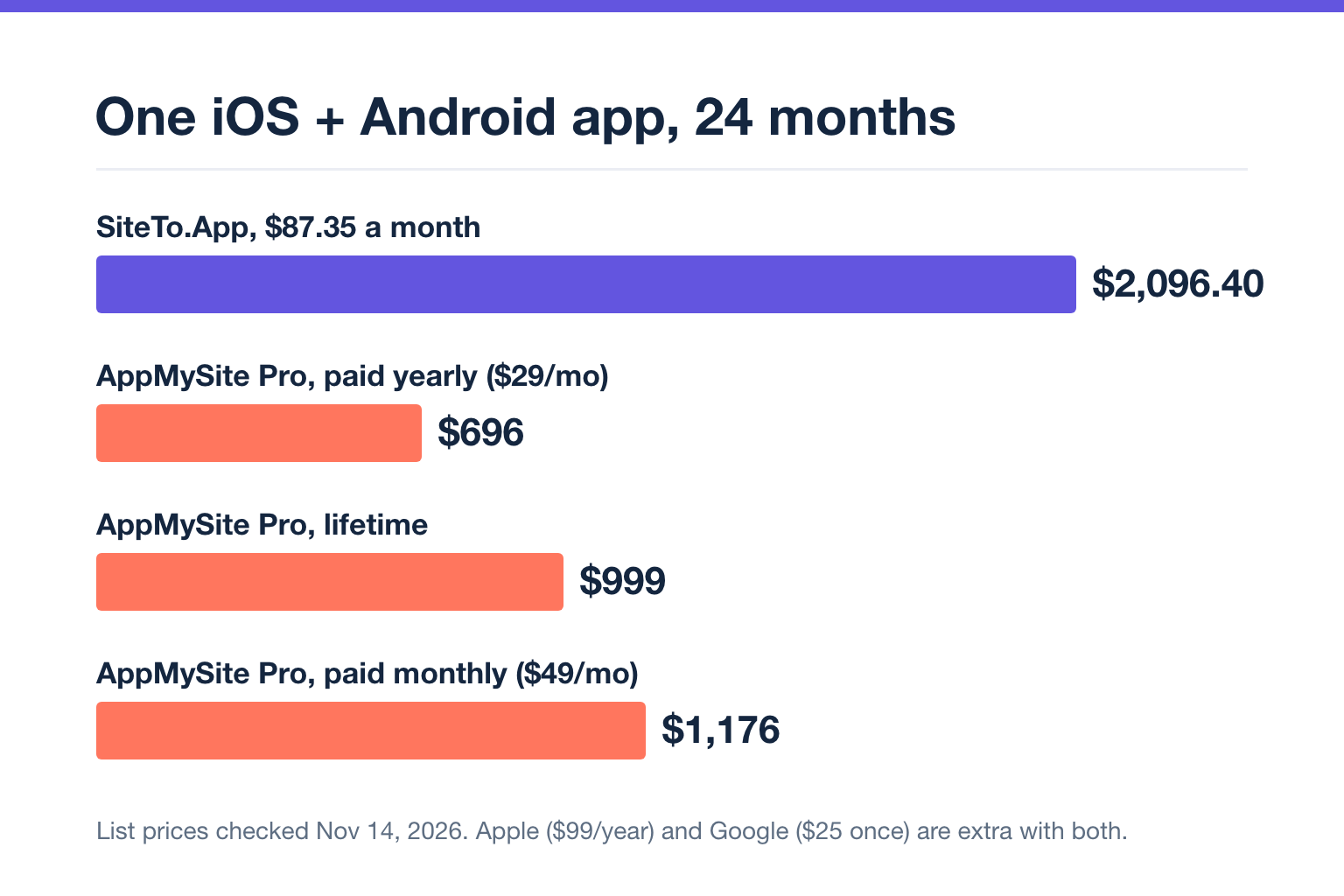
For one app on both iOS and Android, we cost $87.35 a month, or $2,096.40 over 24 months. AppMySite costs $696 to $1,176 over 24 months, depending on how you pay, so it's the cheaper one on price alone. Those are list prices, before Apple's and Google's own fees. There's usually a seasonal offer that brings our monthly price lower, and that price stays while you're subscribed, but AppMySite still costs less.
| Route | What you pay | 24 months |
|---|---|---|
| SiteTo.App, both platforms | $87.35 a month | $2,096.40 |
| AppMySite Pro, paid yearly | $29 a month ($348 a year) | $696 |
| AppMySite Pro, lifetime | $999 once | $999 |
| AppMySite Pro, paid monthly | $49 a month | $1,176 |
Pro is the first AppMySite plan that includes iOS. Its Free and Starter plans are Android only.
If you only need Android, the table looks different:
| Route | What you pay | 24 months |
|---|---|---|
| AppMySite Free | $0, with AppMySite branding and one build | $0 |
| SiteTo.App, iOS and Android (no Android-only plan) | $87.35 a month | $2,096.40 |
| AppMySite Starter, paid yearly | $19 a month ($228 a year) | $456 |
| AppMySite Starter, lifetime | $699 once | $699 |
| AppMySite Starter, paid monthly | $29 a month | $696 |
Three things sit behind those rows:
- Rebuilds are included on both. Apple and Google raise their requirements every year, so you will need new builds. AppMySite's pricing page says paid plans include unlimited app builds. With SiteTo.App, rebuilds are included while you're subscribed.
- Neither takes a cut of your sales. AppMySite lists "No commission on sales" on every plan. We charge the monthly plan and nothing on top.
- Prices move. AppMySite's page showed a "Save up to 41%" banner when I checked, so confirm the numbers there before you buy.
Store fees are extra on every row. Apple's Developer Program is $99 a year and Google Play registration is $25 once. That's $223 over 24 months, whichever tool you pick.
The website to app cost guide lists the other lines to budget.
If you're set on AppMySite for years, I'd take a lifetime plan, because it is a real pay-once price. On Pro, three yearly payments come to $1,044, which is more than the $999 lifetime price.
What's free?
AppMySite's free plan beats ours.
AppMySite Free gives you a real Android app. Its pricing FAQ limits it to one Android build, and the app shows AppMySite branding.
Our free preview is a test on your own phone. You paste your URL, scan a code, and your site opens as an app, with no account or card. You can log in, add to cart and pay, and see how the native header and tabs sit around your pages.
You can't publish the preview. A build you can submit is paid. I wrote more about what "free" really covers across these tools.
I'd take AppMySite Free if its branding is fine for now, because we have nothing like it.
Setup and publishing
Four steps, both tools per step.
- Setup.
- SiteTo.App: it fills in the app name and icon from your site, and AI sorts your links into a native header, side menu and bottom tabs. AI also writes the script that hides your site's own header, cookie banner and pop-ups inside the app. It's mostly automatic, and you can adjust all of it in the dashboard.
- AppMySite: its web-to-app plans list "Customizable design", an in-app browser and real device testing.
- iOS.
- SiteTo.App: we sign your iOS build and upload it to TestFlight in your own App Store Connect account. You don't need a Mac or Xcode.
- AppMySite: its publishing guide says: "Upload the IPA file using the Transporter app or Xcode." Both are Mac apps. Its pricing table lists App Store publishing as "Manual" on Free, Starter and Pro, and "Automated" on Premium.
- Android. Both give you an AAB (the file Google Play accepts) to upload in your own Google Play Console.
- Submit. With both, the developer accounts are yours and you press submit. Neither of us can promise approval.
Apple's review guidelines say an app "should include features, content, and UI that elevate it beyond a repackaged website". That applies to any app that loads a site, and my Guideline 4.2 guide explains what helps.
On step 1, I'd try AppMySite's editor on its Free plan before trusting anyone's description, because I haven't used it. Mine included.
Who owns the app, and what if you stop paying?
AppMySite answers both questions in its own help pages. Read them before you commit.
Who owns it? Its app ownership page says: "the ownership of the app built on AppMySite rests with AppMySite and not the user who creates the app." It then adds: "AppMySite grants you a license for complete usage of the app", and says you're free to customize and monetize it.
I think a license is fine for most small businesses, because you can still run and sell through the app. It matters if your company has a rule about owning its software.
What if you stop paying? Its subscription page says an unrenewed app "will move to the Preview plan" and "will automatically start displaying AppMySite branding." It also says: "Your published app will remain available on the app stores."
So the app stays up, but new downloads show AppMySite's branding until you reactivate. The lifetime plans avoid this because there's nothing to renew.
And with us? It's a monthly subscription too. You can cancel anytime from your account, the plan stays active to the end of the month you paid for. After that your published app and its push notifications keep working; only new builds stop. Your store listings, developer accounts, reviews and the Firebase project that sends your push notifications all belong to you. One limit: you don't get native source code from us either.
Where SiteTo.App fits, and where it doesn't
It fits when your mobile website already does the job and you want it on both stores for one monthly price. You get a native header, tabs and a side menu around your pages. Push runs through your own Firebase project, and the iOS build reaches TestFlight without a Mac.
It doesn't fit when you need more than simple push. Ours sends a title, text, image and link to everyone who opted in, with no segments or scheduling yet. A wrapper is also the wrong base for Bluetooth, AR, heavy offline use or background processing, which call for a custom build.
One limit applies to both tools: neither fixes a weak mobile site, because both show your own pages.
Pick this if
Pick AppMySite if:
- You want a free Android app to experiment with, and its branding is fine for now.
- You want to design the app in an editor, or you have no website.
- You run WooCommerce, Shopify or WordPress and want the product made for that platform. Price it on its own page first.
- You need what Premium lists: advanced push notifications, app analytics, language translation and automated App Store publishing. Premium is $69 a month, $49 a month paid yearly, or $1,499 lifetime.
- Several people will work on the app. AppMySite lists team collaboration on every plan, from 2 users on Free to 5 on Premium.
Pick SiteTo.App if:
- Your site works on mobile and you want it on both stores without designing anything.
- You'd rather not handle upkeep. Unlimited rebuilds and keeping up with Apple's and Google's yearly requirement changes come with the plan. See pricing for what it includes.
Still unsure? Two steps:
- Test both with your real site, on AppMySite's Free plan and our free preview. Do the same things in each: log in, add to cart, pay, follow a link, press back.
- Add up the months you'll keep the app, on the plan you'd really use.
Comparing more widely? My website to app converter comparison covers 11 options side by side. If I got something wrong about AppMySite, email support@siteto.app and I'll correct it with a dated note.
Preview your site as an app for free, with no account or card.
See your website as an app
Customize the experience and preview it before choosing a platform.
Start free trial