On this page
To publish an app, you need a developer account with each store you publish to. Apple charges $99 a year and Google Play charges $25 once. This post covers the totals, the paperwork and the two waits that slow people down.
TL;DR Publishing to both stores costs $124 in year one and $99 a year after that. Apple's fee never ends, and both accounts can be slow to open.
Quick disclosure: I run SiteTo.App, a website to app converter. Our customers publish from their own Apple and Google accounts, so I point people at these two accounts first.
Apple vs Google Play: what does each account cost?
Apple bills you every year. Google bills you once.
| Apple App Store | Google Play | |
|---|---|---|
| What you sign up for | Apple Developer Program | Play Console developer account |
| Fee | $99 a year | $25 once |
| Account types | Individual or organization | Personal or organization |
| Businesses need | A D-U-N-S number (not required for government organizations) | A D-U-N-S number |
| Extra step for individuals | None listed | New personal accounts: 12 testers for 14 days before you can publish |
| If you stop paying | Your apps come off the store | Nothing recurs |
A business pays the same fee as an individual in both stores. Only the paperwork changes.
I checked all of this on November 14, 2026 against Apple's enrollment page and Google's Play Console setup page. Apple lists the fee as 99 USD "in local currency where available", so your card may be charged a slightly different amount.
Rules change. Read both pages again on the day you sign up.
The three-year bill
A one-year price hides the real gap. Google's fee stops after day one, and Apple's comes back every year.
| What you publish to | After 1 year | After 2 years | After 3 years |
|---|---|---|---|
| Google Play only | $25 | $25 | $25 |
| App Store only | $99 | $198 | $297 |
| Both stores | $124 | $223 | $322 |
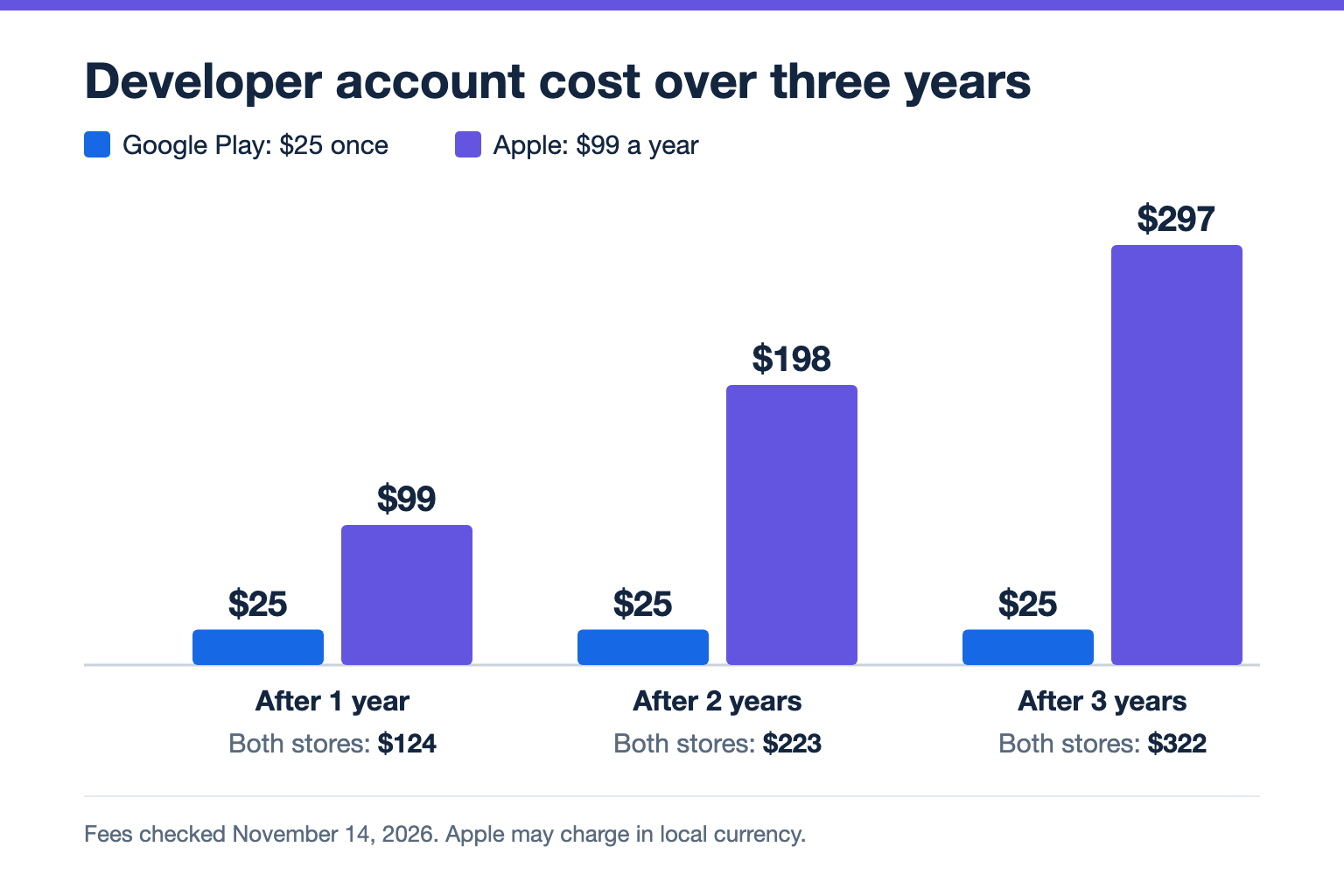
I'd start on Android if you only want to test demand, because it's the cheap way to find out. Google Play alone costs $25 and nothing more.
One limit on all of these numbers: the fees only buy you the right to publish. The app itself is a separate cost, and my website to app cost guide lays out that side of the budget.
Apple developer account: $99 a year, for as long as the app is live
The Apple Developer Program covers the App Store and TestFlight (Apple's service for sending test builds to real phones).
A free Apple Account lets you use Apple's tools and test on your own device. It can't put an app on the App Store.
If the renewal lapses, Apple's renewal page says "your apps will no longer be available for download", and you can't submit updates.
People who already installed the app can keep using it. If you renew later, free apps come back within 24 hours and you don't resubmit anything.
What Apple asks for depends on how you enroll:
- Individual or sole proprietor. Your personal legal name is shown as the seller on the App Store. Apple won't accept a company name or nickname here.
- Organization. You need a registered legal entity, and Apple doesn't accept trade names. You also need a D-U-N-S number (a business ID issued by Dun & Bradstreet), a work email on your company's domain and a working public website. The person enrolling must have the authority to sign legal agreements for the company.
Some organizations can skip the fee. Apple waives it for nonprofits, accredited educational institutions and government entities.
They can't offer paid apps or in-app purchases, or sell digital goods or services through their apps. Individuals and sole proprietors aren't eligible, and the account holder confirms eligibility again at each renewal.
I'd put the renewal date in a calendar more than one person sees, and pay with a card that won't quietly expire. A lapse takes the app down, and an expired card is a dull way to get there.
Google Play developer account: $25 once, with a catch
Google's fee is a single $25 payment with no renewal. Two things on its setup page are worth knowing before you pay:
- Google Play doesn't accept prepaid cards.
- If Google decides the identity details you gave are invalid, the fee isn't refunded.
Type them carefully.
Then you pick an account type. Google's account type guide says a personal account is for personal use and an organization account is for a business.
- Organization. You must provide a D-U-N-S number.
- Personal. You verify that you have an Android device, using the Play Console mobile app.
Google may also ask either account type for a government ID and a credit card in your legal name.
Here's the catch. Personal accounts created after November 13, 2023 have a testing requirement.
You run a closed test (a private release only invited people can install) with at least 12 testers. They must stay opted in for at least 14 days in a row, and only then can you apply to publish.
If that's you, I'd find your 12 people now, because the 14 days can't be hurried. Finding the testers is the slow part.
Individual or organization?
The choice sets how long you wait, and the two waits cost you more than the fees do.
Wait 1: the D-U-N-S number. Both stores use it to check that your company is real. Apple says the numbers are free in most jurisdictions. Google says applying through Dun & Bradstreet is free, and warns about third parties that charge for it.
If your company doesn't have one, request it before anything else, because an organization account in either store can't be completed without it.
Wait 2: Google's 14-day test. This only applies to new personal accounts, and it's a fixed minimum.
For a business, I'd pick organization in both stores, because three things follow from it:
- The name your customers see. On an individual Apple account, the App Store lists your personal legal name as the seller. An organization account lists the company.
- The testing step. Google's 12-tester rule is for new personal accounts.
- What happens when people leave. An organization account is tied to the company, so it stays with the business. A personal account is tied to one person's legal identity, and that gets awkward if that person moves on.
If you're a sole trader with no registered company, publishing as an individual is a fair choice. Be comfortable with your own name on the listing, and plan for Google's test.
Whichever you pick, open the accounts before you start on the app.
Neither company publishes a typical approval time, so I won't guess one for you. Verification runs on Apple's and Google's schedule, and you lose nothing by being approved early.
Do I need a developer account to publish an app?
Yes, but only for the stores you publish to. You can hold off for now if:
- You're still deciding. You can preview your site as an app on your own phone without either account. An Android APK can also be installed straight onto a device.
- You only want one store. Google Play alone needs just the $25 account.
- You're a nonprofit, school or government body. Check Apple's fee waiver before you pay the $99.
I'd hold off on Apple's $99 until you know you want iOS, because that fee is the one that renews.
Whose account should it be? Where SiteTo.App fits, and where it doesn't
Yours. A developer account holds your listing, your reviews, your seller name and the right to ship updates. If a freelancer or agency publishes your app from their account, you depend on them for every future change.
Would you put your domain name in your web designer's account? It's the same question.
Both stores let you keep the account and still bring in help. Apple's enrollment guidance says the organization enrolls, then adds the contract developer to its team. On Google, an account owner can invite users and set their permissions.
So here's what I'd do:
- Create each account with a company email address that more than one person can recover.
- Invite contractors and vendors with the access they need. Don't share the owner login.
- Remove their access when the project ends.
Where SiteTo.App fits. This is how we deliver builds. Your iOS build is signed and uploaded to TestFlight in your own App Store Connect account. Your Android build is a file you upload to your own Play Console.
You submit both, and you see every message from the review teams yourself.
Where it doesn't. We don't submit for you, and we can't guarantee approval. Paying a store fee lets you submit, and the store still decides.
Apple and Google review every app, and Apple's Guideline 4.2 expects more than a website in a frame. I explain what helps in the Guideline 4.2 guide.
Recap: the order I'd do it in
- Decide whose name goes on the listing. Pick the person or legal entity, and use the same one for both stores.
- Request a D-U-N-S number if you're enrolling as an organization and don't have one.
- Enroll with Apple and register with Google. Do both early and let verification run in the background.
- Line up 12 testers if you're opening a new personal Google account.
- Get the app ready while you wait. Check your site's login, checkout and forms on a phone, then preview it as an app.
- Build, test and submit. The store publishing guide walks through each screen.
For step 5, the free SiteTo.App preview needs no account or card. A build later is $87.35 a month for both platforms, rebuilds included while you're subscribed, and Apple's and Google's fees stay separate.
See your website as an app
Customize the experience and preview it before choosing a platform.
Start free trial