
A website to app converter turns a public, mobile-friendly website into an installable iOS or Android app. The website still supplies the pages and content; the app adds elements such as an icon, launch screen, native menus, and optional push notifications. You preview the result, get store-ready builds, and submit them through your own developer accounts.
The quality of your mobile site still determines much of the app experience.
How does a website to app converter work?
The workflow has six practical stages. Each one has a decision that the site owner, rather than the converter, must make.
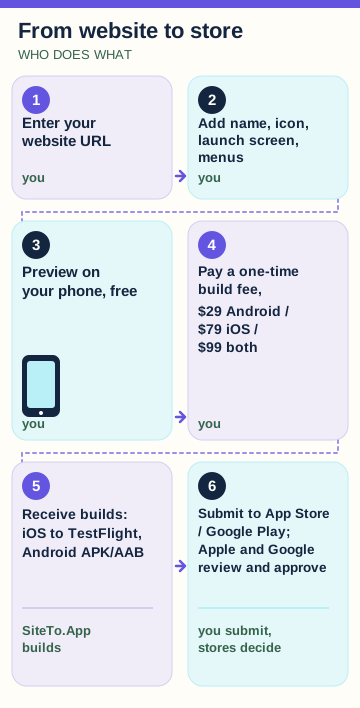
1. Enter a working website URL
Start with a public site that already loads well on a phone. Open its key pages on both iPhone and Android before you configure an app. Check login, checkout, booking, forms, videos, external payment handoffs, and account recovery. If a menu is hard to tap in a mobile browser, placing it inside an app will not repair it.
Your domain, web hosting, content system, and payment setup continue to operate as before. A WordPress publisher can keep editing in WordPress; a Shopify merchant can keep managing products in Shopify. The WordPress platform guide Dan Shopify platform guide give examples of flows to test for each site type.
2. Add the app identity and mobile menus
Choose the visible app name, icon, launch screen, colors, and a small set of useful destinations. App menus should take people to the tasks they repeat, rather than reproducing every link in a desktop header. A store might use Browse, Orders, and Account; a membership site might use Home, Events, and Profile.
SiteTo.App is a no-code website-to-app converter: you enter a public, mobile-friendly website, add your app name, icon, launch screen and menus, preview it on your phone for free, and pay a one-time build fee ($29 Android, $79 iOS, $99 both) for store-ready iOS and Android builds.
3. Preview on a real phone
The preview is where you learn whether the site's existing flows work inside the app. SiteTo.App's preview is free and requires no credit card. Visit more than the home page: sign in, complete a form, open a product, try the checkout handoff, and follow a notification destination if you plan to use push.
Test how the keyboard, back action, loading state, external links, and narrow screens behave. Have someone who did not build the site try the main task.
4. Request the platform build
After the preview, choose iOS, Android, or both. A build packages the site experience with your app settings for the selected platform. SiteTo.App uploads iOS builds to TestFlight in your own App Store Connect account. For Android, it provides a downloadable APK or AAB; the AAB is the file you use for a Google Play listing.
This is a build, not a completed store launch. You still need store assets, declarations, and testing. For a fuller sequence, follow the website-to-mobile-app walkthrough.
5. Complete the listing and submit
Create or use developer accounts in the name of the person or business that will publish the app. Prepare descriptions, screenshots of the actual app, a support URL, privacy details, and reviewer access if the main content requires login. Test the delivered build before you submit it.
SiteTo.App does not submit the build to Apple or Google. The publisher selects the build, completes each store's forms, and submits it for review. Apple and Google decide whether to approve it. The store publishing guide covers the tasks after a build is ready.
6. Maintain both layers
When you edit an ordinary page, article, product, or price on the live site, the app loads that current website content. Changing the app icon or native configuration is different: it needs a new build. Later rebuilds or configuration changes are quoted separately. Keep the site fast and tested, and plan for future store requirements even if most day-to-day changes happen on the web.
What lives on your website, and what does the app add?
Think of the app as a mobile layer around an existing service. The line matters for planning work and avoiding promises that a converter cannot keep.
| What lives on your website | What the app adds |
|---|---|
| Pages, articles, products, and prices | Installable iOS or Android app entry point |
| Login, forms, checkout, and business rules | App icon and launch screen |
| Hosting, domain, and web performance | Native menus and focused navigation |
| Website design at phone widths | Push notifications through your own Firebase project |
| Everyday content changes | Optional SDK controls for titles, badges, sharing, and app events |
The exact experience depends on what your website already does. If the checkout opens a different domain or an identity provider, test that handoff in the preview. A slow site remains slow when loaded inside an app. A useful way to budget is to list web fixes separately from app setup and from the cost of publishing; our panduan biaya situs web-ke-aplikasi breaks out those categories.
The app layer can be genuinely useful. SiteTo.App notifications can open a specific page when tapped. Its SDK JavaScript lets your website set native titles, badges, the active tab, the native share sheet, notification permission, and app-resume behavior. Those integrations require work on the website. They are options for a product with a clear use case, not proof that every website needs an app.
Who is a converter a good fit for?
A converter fits an owner who already has a stable, mobile-friendly website and a reason people will return. A publication may want a convenient reading entry point and selected notifications. A store may want repeat customers to reach orders and products quickly. A member community may need account access on the home screen. The site remains the source of truth in each case.
It can also fit a small team that wants to avoid maintaining separate iOS and Android content systems. Editors publish to the existing site. The app points to it. This reduces duplicate content work, although it does not remove testing, account management, or native rebuilds when platform rules change.
Before choosing a converter, name the app's repeated task. Ask what a returning customer will do in the app that is easier than opening a browser tab. If the answer is only “see our brochure,” an app may have little value. You could improve the mobile site or use a home-screen shortcut first. The PWA, native app, and WebView comparison explains those alternatives.
Where does the approach stop fitting?
Some product requirements need a custom native or cross-platform build. Bluetooth devices, augmented reality, heavy offline workflows, and background processing are examples. A website-based app is a poor foundation if the product must keep doing its main job without a network connection or rely on deep hardware behavior. A converter should not be sold as a ground-up native rebuild.
There is also a store-review boundary. Apple Guideline 4.2 can reject apps that add nothing useful beyond a repackaged website. Native menus, notifications, or sharing should serve a real user purpose; merely changing the icon does not establish one. Read the Apple Guideline 4.2 explanation before you prepare an iOS listing. Neither a converter nor a custom developer can guarantee approval.
Finally, a converter does not take over website hosting or fix every web integration. If a third-party widget breaks on small screens, test or replace the widget on the site. If a form depends on popups, verify it in the preview. The best first investment is often improving the mobile site, because both browser visitors and app users benefit.
What should you check before paying?
Make a short checklist based on your site's real use. Confirm that the main task works on a phone; identify the native elements you want; test the preview; read the handoff for iOS and Android; and make sure the publishing accounts belong to the right entity. Record the cost of the build, developer accounts, and future changes separately.
SiteTo.App charges a one-time build fee and no SiteTo.App subscription. Its halaman harga lists $29 for Android, $79 for iOS, and $99 for both. Apple and Google developer-account fees, hosting, and paid third-party services are separate. A later change to the icon or native settings is another build, quoted separately. That distinction helps you compare a one-time build with a recurring managed service or subscription builder on equal terms.
Pertanyaan umum
Can a converter turn any website into a useful app?
No. A converter needs a public, mobile-friendly site whose important tasks already work on a phone. It can add an app layer, but it cannot repair a slow checkout, unreadable text, broken login, or weak reason to return. Test the full journey in a real-device preview before deciding whether the app is worth publishing.
Does updating my website update the app?
Yes, for ordinary content and page changes that the app loads from your live website. New products, articles, and routine page edits appear through that web layer. A new icon, launch screen, native menu setting, or other app configuration change needs another build; later rebuilds and configuration work are quoted separately.
Do I need coding skills to use SiteTo.App?
No, the basic flow is no-code: enter a URL, configure the app, preview it, and request a build. Your website still needs to work well on mobile. Advanced behavior through the JavaScript SDK requires website development, and you must complete store listings and submissions in your own Apple and Google accounts.
Will Apple accept an app made from my website?
Maybe. Apple decides after reviewing the finished app, its content, functionality, and listing. Guideline 4.2 can be a problem if the app adds little beyond a website. Give users a useful mobile experience, provide complete reviewer access, and explain the app-specific value honestly. No converter can promise App Store approval.
Is a PWA the same as a converted app?
No. A progressive web app is a web experience with installation-like behavior supported by browsers and operating systems. A converted app is a platform build prepared for app-store distribution and can add native navigation or notifications. Which one fits depends on whether you need store listings, specific device features, and the associated account work.
Langkah selanjutnya
Open your main site journey on a phone, note any problems, then preview your website in SiteTo.App for free. Use that preview to decide whether the app layer improves the experience before paying for a build.
Lihat situs web Anda sebagai aplikasi
Sesuaikan pengalaman dan pratinjau sebelum memilih platform.
Bangun pratinjau Anda